How to copy and paste between Android and Windows
To copy and paste from an Android phone to a Windows PC, use Phone Link if your phone is a supported Samsung, HONOR, OPPO, OnePlus, ASUS, vivo or Xiaomi model, or the SwiftKey keyboard for your last copied text. On any other phone, paste what you copied into a web clipboard like Colurus and copy it on the PC, or send it to yourself in a chat.
Updated · Colurus
Quick answer
| Method | What it moves | Works with | Cost |
|---|---|---|---|
| Phone Link | What it movesText and images, both ways, on its own once set up | Works withSome Samsung, HONOR, OPPO, OnePlus, Realme, ASUS, vivo and Xiaomi phones | CostFree |
| SwiftKey + Win+V | What it movesYour last copied text, for 1 hour | Works withAny Android phone with the SwiftKey keyboard and a personal Microsoft account | CostFree |
| Message yourself | What it movesText, links and photos you send one by one | Works withAny phone with WhatsApp or Telegram, plus their web or desktop app | CostFree |
| Email yourself | What it movesText, links and attachments | Works withAny phone and PC | CostFree |
| KDE Connect | What it movesText; from the phone you tap Send clipboard | Works withPhone and PC on the same network | CostFree, open source |
| Colurus | What it movesText, links, images and code you paste, kept with history | Works withAny browser (tested in Chrome on PC and Android) | CostFree up to 200 items; Pro $6/month |
Facts about each app checked on their own pages on October 9, 2026 (see Sources).
Can you copy on Android and paste on Windows?
Yes, but rarely on its own. Since Android 10, only the keyboard you're using and the app on screen can read the clipboard. That's why most apps that promised to sync it in the background stopped doing so, and why the methods below either work on a few phones, go through a keyboard, or ask you to paste or tap a button.
Windows also has its own clipboard history (press Win + V), but it only syncs between Windows PCs signed in to the same account. To reach your phone it needs Phone Link or SwiftKey.
How to copy and paste from your phone to your PC with Phone Link
Phone Link comes with Windows 10 and 11, and its companion app on Android is called Link to Windows. Once it's set up, text and images you copy on one device can be pasted on the other.
- 1Install Link to Windows on your phone and open Phone Link on your PC.
- 2Sign in with the same personal Microsoft account on both. Work and school accounts aren't supported.
- 3On the PC, open Phone Link's Settings > Features and turn on Cross-device copy and paste.
- 4Copy on one device and paste on the other as usual.
The catch: copy and paste only works on some phones: Samsung with One UI 2.1 or later, HONOR Magic4 Pro and Magic6, OnePlus, OPPO Find and Reno, Realme, ASUS ROG Phone 8, vivo X Fold3 Pro and Xiaomi 14T. Images over 1 MB are resized, and both devices need Wi-Fi unless you let it use mobile data.
Since December 2025, Link to Windows can also copy what you copy on a Windows 11 PC to the phone, according to Windows Latest. That's the PC-to-phone direction only.
Sync your clipboard between Android and Windows with SwiftKey
If your phone isn't on the Phone Link list, Microsoft's SwiftKey keyboard can send the text you copy to the Windows clipboard history:
- 1On the PC, press Win + V, turn on clipboard history, then turn on Clipboard history across your devices in Settings > System > Clipboard.
- 2On the phone, install SwiftKey, make it your keyboard and turn on clipboard sync in its settings.
- 3Sign in to both with the same personal Microsoft account (Outlook.com or Hotmail.com).
The catch: it only keeps your last copied text, it's available for one hour, and images aren't included. On the PC, Win + V keeps up to 25 items and clears them when you restart, except the ones you pin.
Send it to yourself: WhatsApp, Telegram or email
This is what most people do. WhatsApp has a chat with yourself (“Message yourself”) and Telegram has Saved Messages. You send the text or the photo from your phone, open WhatsApp Web, the desktop app or Telegram on the PC, find the message and copy it. Email works the same way.
It works on any phone and costs nothing. The downsides are the steps: open the chat, send, switch to the computer, open the app, scroll to the message, copy. And everything you send piles up between your real conversations.
KDE Connect, and what about Pushbullet?
KDE Connect is free and open source, with apps for Android and Windows (plus Linux and Mac). Text you copy on the PC reaches the phone on its own. In the other direction, on Android 10 and later, you tap Send clipboard in its notification. Both devices must be on the same network, and it doesn't send images through the clipboard.
Pushbullet was the classic answer, and its universal copy and paste was a Pro feature. Today its Android app was last updated in August 2025 and its Chrome extension in March 2023. If you're leaving it, our list of Pushbullet alternatives compares the options.
Copy on your phone, paste on your PC with Colurus
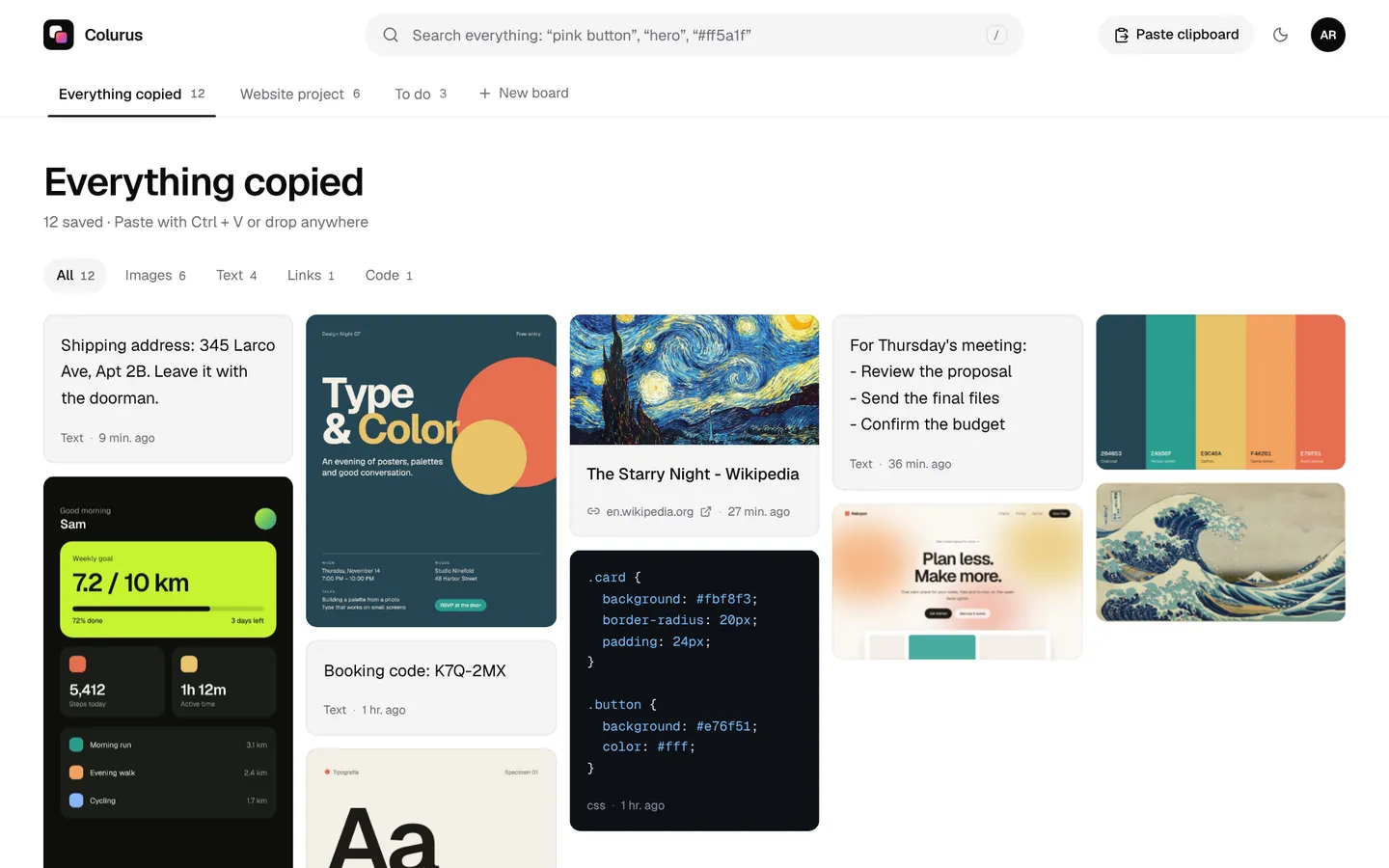
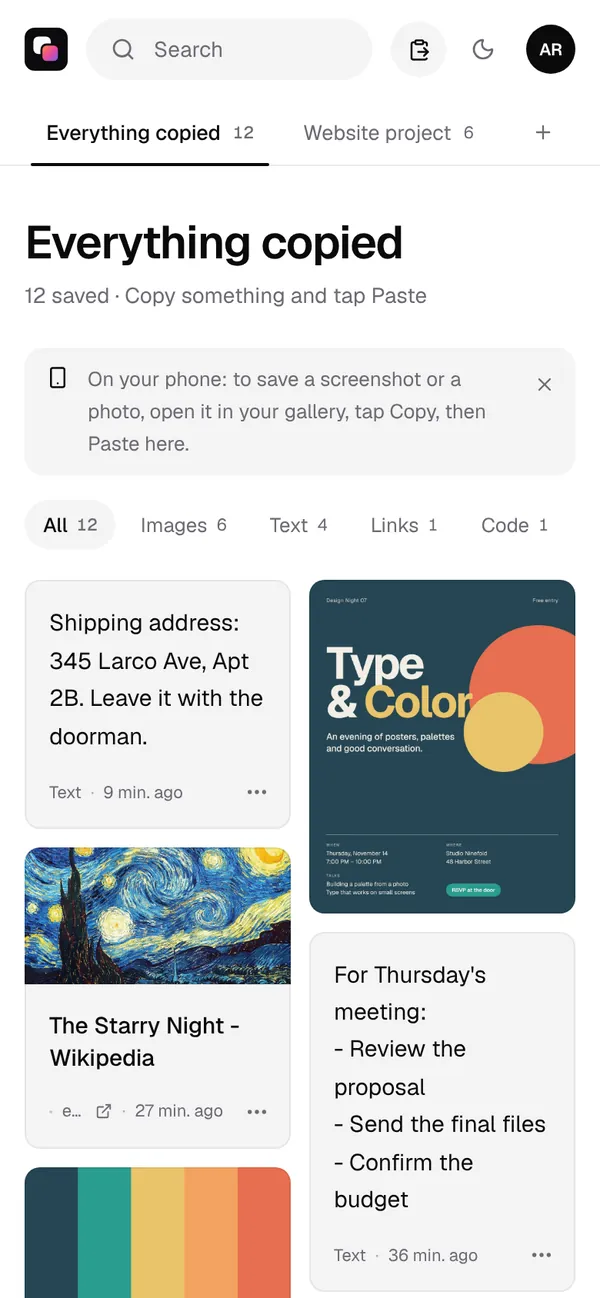
Colurus is a clipboard in the cloud that runs in the browser, so it works with any Android phone and any PC. It doesn't read your clipboard on its own: you paste what you want to keep, and it stays in your account until you delete it.
- 1On your phone, open colurus.com in Chrome and sign in with Google.
- 2Copy a text, a link or a photo from your gallery, and tap Paste in Colurus.
- 3On the PC, open Colurus with the same Google account (or reload the page if it was open). Click a text to copy it (or use the copy button on any item) and paste it with Ctrl + V.
It works the other way too: press Ctrl + V in Colurus on the PC and copy it on your phone. Images copy back as PNG, and Colurus also reads the text and the colors in your screenshots.
Just once and without an account? The free online clipboard sends up to 5 texts, links or images with a 6-character code, and deletes them after 24 hours.
Sign in with Google. Free: 200 items, 2 boards and AI on 10 images a day.
Try Colurus freeWhich one should you use?
- Your phone is on Phone Link's list: turn on cross-device copy and paste. It's built in and automatic.
- You only move a text now and then: SwiftKey's sync, or a message to yourself.
- Phone and PC are always on the same Wi-Fi and you like open source: KDE Connect.
- You want what you copy to stay, with images, on any device: Colurus.
You can also combine them: Win + V for what you copied in the last few minutes on the PC, and Colurus for what you want to find again next week. Moving text only? See how to send text from your phone to your PC, step by step. Looking for something like AirDrop? Here's AirDrop for PC and Quick Share for Windows.
Sign in with Google. Free: 200 items, 2 boards and AI on 10 images a day.
Try Colurus freeFrequently asked questions
How do I copy and paste from my phone to my computer?
+
If your phone works with Phone Link's copy and paste, turn it on and copy as usual. On other Android phones, use SwiftKey's clipboard sync for your last copied text, or paste what you copied into Colurus on the phone and copy it from Colurus on the computer.
Can I copy and paste from Android to PC without installing anything?
+
Yes, through the browser: open Colurus or the free online clipboard on both devices, paste on the phone and copy on the PC. Sending yourself a message on WhatsApp Web or by email also works without installing anything on the PC.
Why doesn't clipboard sync work on my Android phone?
+
Since Android 10, only the active keyboard and the app on screen can read the clipboard. Apps that synced it in the background now need a keyboard (like SwiftKey), a button you tap, or support from the phone maker (like Phone Link on some brands).
Does Phone Link copy and paste work on every Android phone?
+
No. Microsoft lists Surface Duo and select Samsung, HONOR, OPPO (including OnePlus and Realme), ASUS, vivo and Xiaomi phones. Other phones can use Phone Link for other things, but not to copy and paste.
Can I copy images from my phone to my PC?
+
Yes with Phone Link on supported phones (images over 1 MB are resized), by sending them to yourself in a chat, or with Colurus: copy the photo from your gallery, tap Paste, and copy it on the PC as a PNG. SwiftKey's sync is text only.
Do my phone and PC need to be on the same Wi-Fi?
+
KDE Connect needs the same network. Phone Link uses Wi-Fi, or mobile data if you allow it. SwiftKey, chats, email and Colurus work over the internet, on any network.
Is Colurus free?
+
Yes. The free plan keeps 200 items and 2 boards, with AI on 10 images a day. Pro costs $6 a month or $60 a year, with no limits. You sign in with Google.
Sources
- Microsoft Support: Copy and paste between your devices (Phone Link)
- Microsoft Support: Phone Link requirements and setup
- Microsoft Support: Copy and paste text between SwiftKey and Windows
- Microsoft Support: Using the clipboard in Windows (Win+V)
- Windows Latest (Dec 17, 2025): Link to Windows shares the PC clipboard with Android
- Android Developers: Android 10 privacy changes (clipboard access)
- TechCrunch (Nov 28, 2022): WhatsApp's Message yourself
- WhatsApp Help Center: WhatsApp Web
- Telegram blog: Saved Messages
- KDE Connect: official site
- KDE UserBase: KDE Connect (clipboard on Android 10 and later)
- Google Play: Pushbullet (last update Aug 27, 2025)
- Chrome Web Store: Pushbullet (last update Mar 25, 2023)
Facts about each app checked on October 9, 2026. If something changed, tell us and we'll fix it.