AirDrop for PC: Quick Share for Windows, or a way with no app
There is no AirDrop for PC: Apple's AirDrop only works between Apple devices. From an Android phone, the closest thing is Google's Quick Share for Windows, which sends files over Bluetooth and Wi-Fi once you install it on the PC. To send text, links and photos with no app at all, open Colurus in the browser on both: paste on your phone, and it's on your PC with a 6-character code, no account needed. With a free account, everything you send stays saved to copy again later.
Updated · Colurus
Quick answer
| Option | Phones and PCs | You need | Texts and links |
|---|---|---|---|
| Colurus with a code | Phones and PCsAndroid and any PC, in the browser | You needInternet; no app, no account | Texts and linksYes, plus photos: up to 5 per code, deleted after 24 hours |
| Colurus account | Phones and PCsAndroid and any PC, in the browser | You needA Google account | Texts and linksYes, saved until you delete them |
| Quick Share for Windows | Phones and PCsAndroid and a 64-bit Windows 10 or 11 PC | You needThe app on the PC, Bluetooth and Wi-Fi on, within 5 m (16 ft) | Texts and linksMainly files and photos |
| Phone Link | Phones and PCsSome Android phones and Windows | You needA Microsoft account; copy and paste only on some brands | Texts and linksCopy and paste on supported phones |
| LocalSend | Phones and PCsAndroid, iPhone, Windows, Mac, Linux | You needThe app on both, same Wi-Fi; works without internet | Texts and linksYes, you accept each one |
| AirDrop | Phones and PCsiPhone, iPad and Mac (and Pixel 10 via Quick Share) | You needApple devices nearby | Texts and linksYes, but not to Windows |
Facts about AirDrop, Quick Share and the other apps checked on their own pages on October 22, 2026 (see Sources).
Is there AirDrop for PC?
No. AirDrop is Apple's, and it only sends between iPhone, iPad and Mac. There's no AirDrop app for Windows, and Android phones don't have it either: since November 2025, Pixel 10 phones can send to an iPhone or a Mac through Quick Share, but that still doesn't reach a Windows PC.
What people want from "AirDrop for PC" is simple: copy something on the phone and have it on the computer a few seconds later, without a cable and without emailing it to yourself. From Android, that you can do.
Send from your phone to your PC with a code, like AirDrop
Colurus runs in the browser, so it works on an Android phone and on any PC, even a work computer where you can't install anything. With the free online clipboard there's no sign-up:
- 1On your phone, open colurus.com/c and paste a text or a link, or choose a photo. You get a 6-character code.
- 2On the PC, open colurus.com/c and type the code. What you send next shows up on its own, without reloading.
- 3Click Copy or Download. Photos arrive in their original quality.
One code holds up to 5 texts, links or photos and is deleted after 24 hours. It works the other way too: paste on the PC and scan the QR code with your phone. Only photos? The page for sending photos from your phone to your PC is made for that.
From the Android Share menu, straight to your PC
The closest thing to AirDrop's share button: install Colurus on your Android phone from Chrome (open colurus.com, tap the menu and Install app, or Add to Home screen). From then on Colurus appears in the Share menu of any app.
- 1Take a screenshot, or open a photo, a link or a text in any app, and tap Share.
- 2Choose Colurus. It's saved to your account.
- 3On the PC, open Colurus with the same account and click it to copy it, or reload the page if it was already open.
What AirDrop doesn't do: keep what you sent
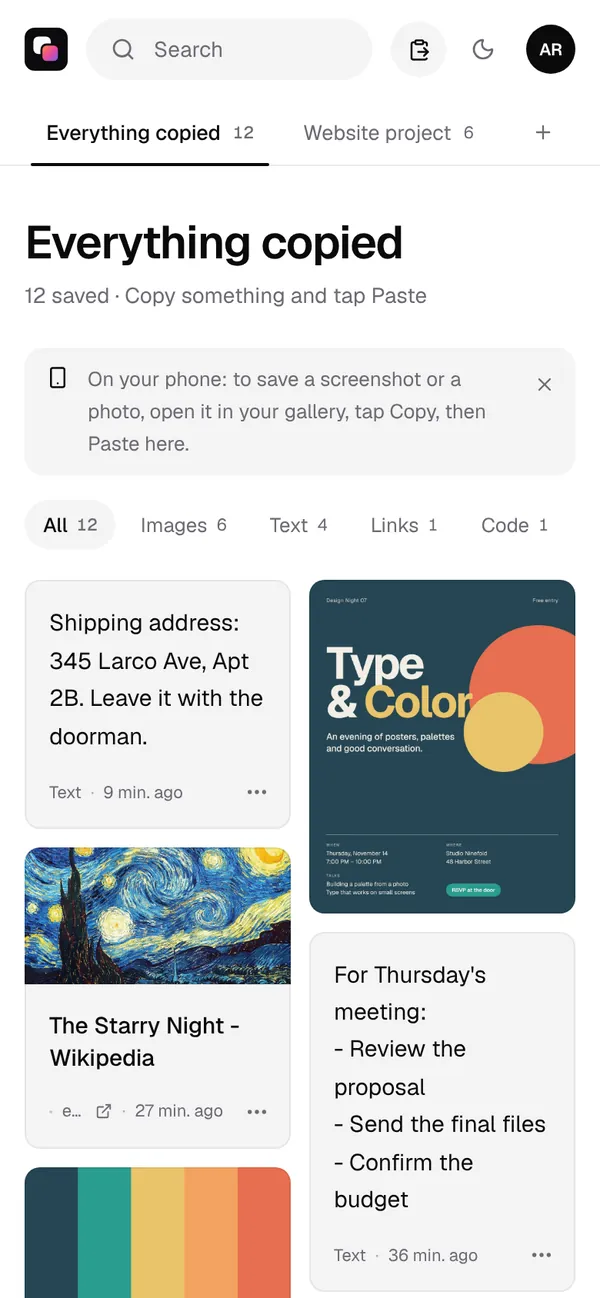
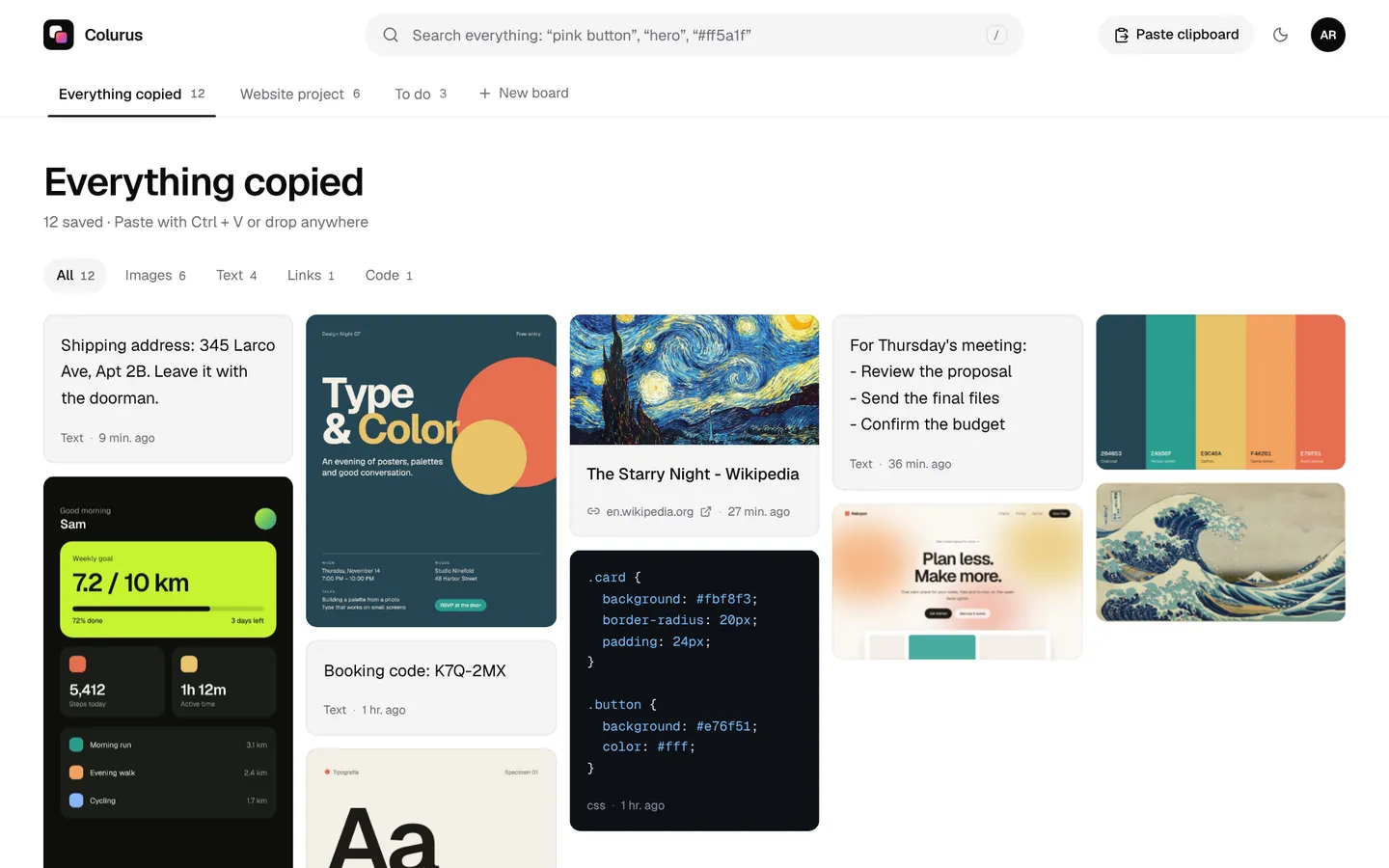
AirDrop and Quick Share hand a file over and forget it. Colurus is a clipboard history in the cloud: with a free account, each text, link, screenshot or code you paste stays saved until you delete it, so next week you can copy it again on your phone, your laptop or the office PC. A search finds it, even a word inside a screenshot, and what you use often can be pinned to the top.
Sign in with Google. Free: 200 items, 2 boards and AI on 10 images a day.
Try Colurus freeWithout internet: LocalSend
If there's no internet but both are on the same Wi-Fi, LocalSend is free and open source and runs on Android, iPhone, Windows, Mac and Linux. You install it on both, pick the nearby device and accept. Colurus and the online clipboard need internet; LocalSend doesn't.
Which one should you use?
- Android, nothing to install, once: Colurus with a code.
- Every day, and you want to find things again: a free Colurus account, with Share → Colurus on Android.
- Big files from Android, PC nearby: Quick Share for Windows.
- No internet: LocalSend.
Looking for something to replace Windows' own clipboard history? Compare it in our Win+V alternative page.
Sign in with Google. Free: 200 items, 2 boards and AI on 10 images a day.
Try Colurus freeFrequently asked questions
Is there AirDrop for PC?
+
No. AirDrop only works between Apple devices. From an Android phone, Google's Quick Share for Windows is the closest thing; with no app, a browser tool like Colurus sends text, links and photos with a code.
What is the Android version of AirDrop?
+
Quick Share, built into Android 6 and later. It sends to other Android phones, to Windows PCs with the Quick Share app and, since November 2025 on Pixel 10, to iPhones and Macs with AirDrop set to Everyone for 10 minutes.
Why isn't Quick Share for Windows finding my phone?
+
Google's checklist: turn on Wi-Fi and Bluetooth on the PC, turn on Location on both devices, keep the phone within about 5 meters (16 feet), and check that the PC is 64-bit Windows 10 or later. On a Samsung PC, use Samsung's Quick Share app instead.
Can I send text and links, not just files?
+
Yes. Colurus sends texts, links and images, and links show the page's title and picture. Quick Share and AirDrop are mainly for files.
Do photos lose quality?
+
No. They're sent at full size, up to 10 MB each, without compression.
Does it work without Bluetooth?
+
Yes. Colurus goes over the internet, so the phone and the PC don't need Bluetooth or the same Wi-Fi, and they can be in different places.
Is Colurus free?
+
Yes. The online clipboard is free with no account. The free plan keeps 200 items and 2 boards; Pro costs $6 a month or $60 a year.
Sources
- Apple Support: Use AirDrop to send items to nearby Apple devices
- Android: Quick Share for Windows (requirements and FAQ)
- Android Authority (Nov 20, 2025): Quick Share works with AirDrop on Pixel 10
- Microsoft Support: Copy and paste between your devices (Phone Link)
- LocalSend: official site
- PairDrop on GitHub
Facts about each app checked on October 22, 2026. If something changed, tell us and we'll fix it.